An AI colleague who lives on your Mac
Tell Otoha what you need. She gets it done.
Otoha researches, writes documents, and builds spreadsheets and slides in your project folder. When a decision is yours to make, she comes back and asks.
macOS 13 or later · Apple silicon
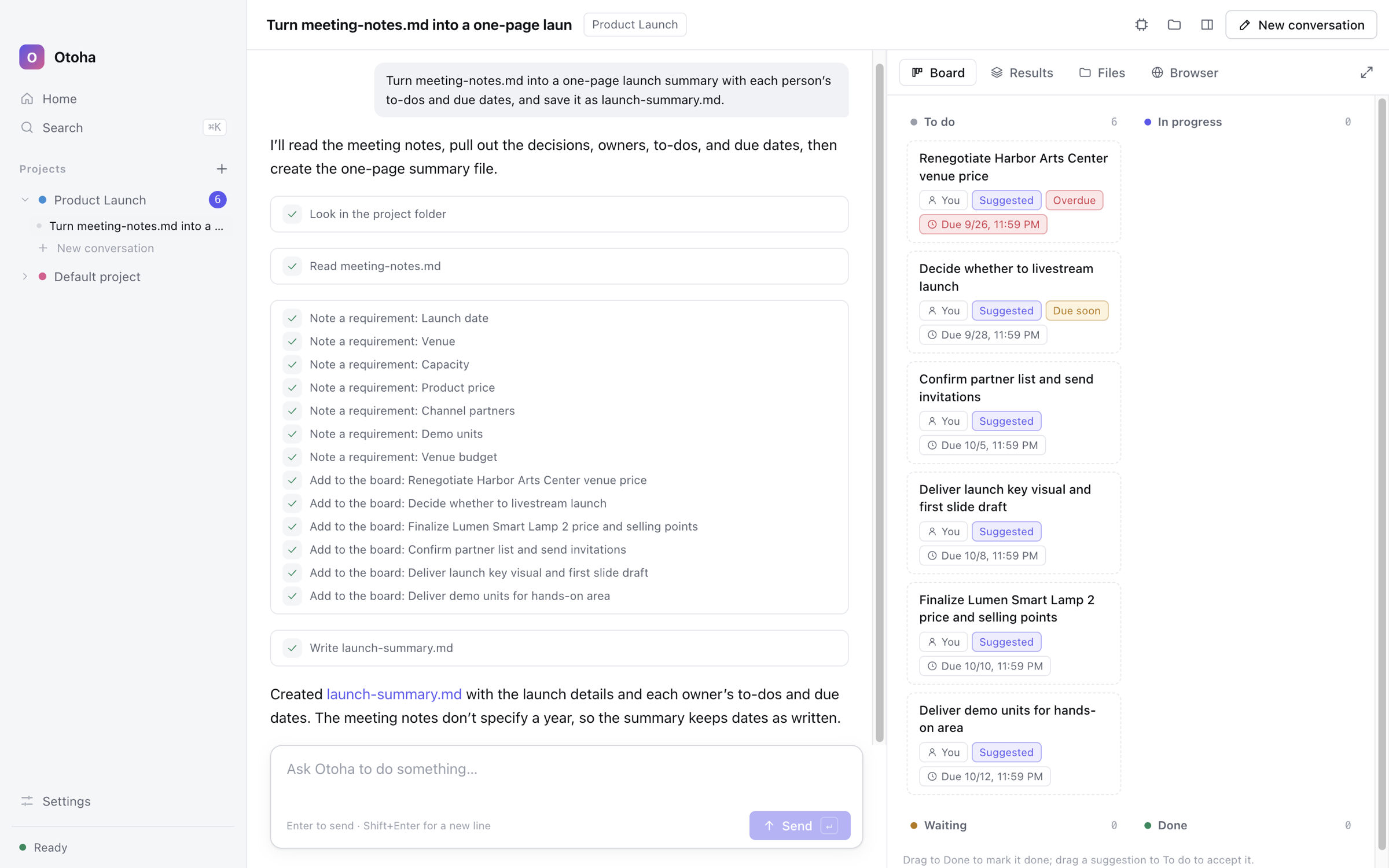
You always know what she is doing
There's no need to learn what runs underneath. Otoha tells you what she is working on, what she has finished, and when she needs your call.
Hand over a task in three steps
- 1
Start a project
Pick a folder and put the material in it. Every piece of work has its own place.
- 2
Tell Otoha what you want
Say it the way you would to a colleague, such as “Make an 8-slide launch deck.”
- 3
Approve, then collect the results
She asks before changing any file. Finished files wait for you in the project’s Results.
What Otoha can do for you
Works project by project
Each project has its own folder, board and results, so progress is easy to follow.
Researches on the web
She searches and opens pages in the built-in browser, where you can see what she read.
Makes documents, spreadsheets and slides
Word, Excel, PowerPoint and web slide decks, saved straight into the project folder.
Asks before changing things
Before she changes a file or runs a tool, she asks you and shows exactly what will change.
Mistakes can be undone
She keeps a copy before changing a file, so you can go back to an earlier version at any time.
Your files stay on your Mac
She works only in the project folders you allow, and sends only what a task needs to the cloud model.
The models Otoha uses
Use the model built into your Mac, or connect your own OpenAI, Anthropic or DeepSeek account.
- GPTOpenAI
- ClaudeAnthropic
- DeepSeekDeepSeek
- On-device Mac modelFreeApple's on-device model runs right on your Mac, and what it reads never leaves it. Requires macOS 26 or later on a Mac that supports Apple Intelligence.
To use a maker's models, get an API key on its website and add it in Otoha's Settings; the maker bills your account. Once Otoha's cloud service opens, you won't need keys of your own.
The right model, chosen for youComing soon
Arriving with the cloud service: Otoha will decide which model each step needs. For now, pick a default model in Settings, or choose Automatic to use a cloud model when one is set up and the on-device model otherwise.
Matched to the task
Lighter models for simple sorting and summaries, standard models for writing and planning, stronger ones for hard problems, long documents and code.
Careful with your credit
She prefers the less expensive model when it does the job well, and only picks models that can see images when a step needs it.
Or pick one yourself
Fix a model in Settings to always use it, or switch to the on-device Mac model, which uses no credit.
Pricing
Free to use today. Otoha's cloud service is coming soon: buy monthly credit, with no keys of your own to manage.
- NowUS$0
- The on-device Mac model is free
- Or use your own model account, billed by its maker
- PlusUS$20/ monthEveryday work
- A monthly allowance of credit
- Every cloud model
- Automatic model choice
- ProUS$50/ monthHeavy daily use
- A monthly allowance of credit
- Every cloud model
- Automatic model choice
- MaxUS$150/ monthIntensive research, writing and slide decks
- A monthly allowance of credit
- Every cloud model
- Automatic model choice
Credit pack US$50
Need more? Add a credit pack. Its credit carries over from month to month and never resets.
- These are the planned prices for when the cloud service opens; the purchase page will have the final terms.
- Plan credit is granted every 30 days and does not carry over; plan credit is used first, then credit packs.
- Payments will be handled securely by Stripe.
Questions
- Do I need to pay now?
- No. The on-device Mac model is free, and if you have an OpenAI, Anthropic or DeepSeek account you can add your API key in Settings; the maker bills your account.
- When does the cloud service open?
- We're getting it ready. Then you'll buy monthly credit on this site, Otoha will choose the right model for each step, and you won't need keys of your own.
- What does the on-device model need?
- macOS 26 or later on a Mac that supports Apple Intelligence. Everything is processed on your Mac and never leaves it.
- Are my files uploaded?
- Your files stay on your Mac. Otoha works only in the project folders you allow and sends a cloud model only what a task needs; with the on-device model, nothing leaves your Mac.
Get started on your Mac
Download and open it, choose the on-device Mac model or add your own model account in Settings, and hand Otoha your first task.
Download for MacmacOS 13 or later · Apple silicon